Photopipe automates high-volume image editing with learned style profiles
Photopipe applies generative AI to automate high-volume image editing and delivery workflows, letting photographers teach an editing look from a minimal sample set and apply it across large shoots. The independent developer builds the web app for professional event and e-commerce photographers, combining automated culling, batch editing, upscaling, and client proofing in one browser-based workspace. It targets teams and studios that need consistent visual output and faster turnaround without powerful local hardware.
What tasks can you actually use it for?
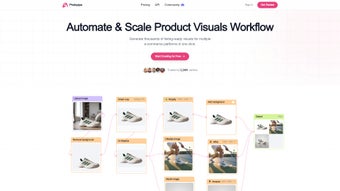
Photopipe handles the sequence from selection to delivery: uploads enter an end-to-end pipeline that includes AI-assisted culling, batch editing using a learned style profile, AI upscaling, and branded client galleries for proofing and selection. The platform explicitly supports product-image workflows for e-commerce platforms such as Shopify and Etsy, and it aims at event and portrait shoots where thousands of frames require processing.
How reliable are the generated edits and selections?
Quality is consistent when the style profile matches your look: the system can replicate an editing style from as few as three reference photos, which users report preserves consistency across different lighting conditions. Automated culling evaluates technical factors and scene interaction, producing pick/skip groupings that reduce manual selection time; some outputs still require human verification for final brand or client approval.
What inputs and limits should you expect?
The tool runs in a browser and accepts large batches for automated processing; no local GPU or model installation is required, so source files upload to the platform for server-side processing. The style-learning workflow depends on supplying sample reference images to define the target look, and the platform delivers private, branded galleries rather than exposing raw files for download during proofing.
Is it easy to slot into an existing production workflow?
Integration is oriented toward high-volume pipelines rather than single-image editing: the unified workspace replaces separate culling, editor, and delivery steps and includes e-commerce integrations. Users report a learning curve adapting to AI-driven steps, so teams should plan an initial validation phase to align the tool's outputs with client expectations before relying on it for unattended runs.
Clear time-savings for teams that accept an AI-led workflow
The platform delivers substantial throughput improvements for professional teams and studios processing large image volumes, though it requires an upfront shift in how work is validated and reviewed. Expect to set aside time for initial alignment between your creative standards and the tool's outputs; once that is done, the workflow can reduce repetitive tasks while retaining human oversight for final approvals.